
GPT Image 2.5 in ImagEditorAI: What Changed vs GPT Image 2
GPT Image 2.5 is now the Pro-plan flagship in our AI image editor. Here is what it improves over GPT Image 2, and when each model is the right pick.
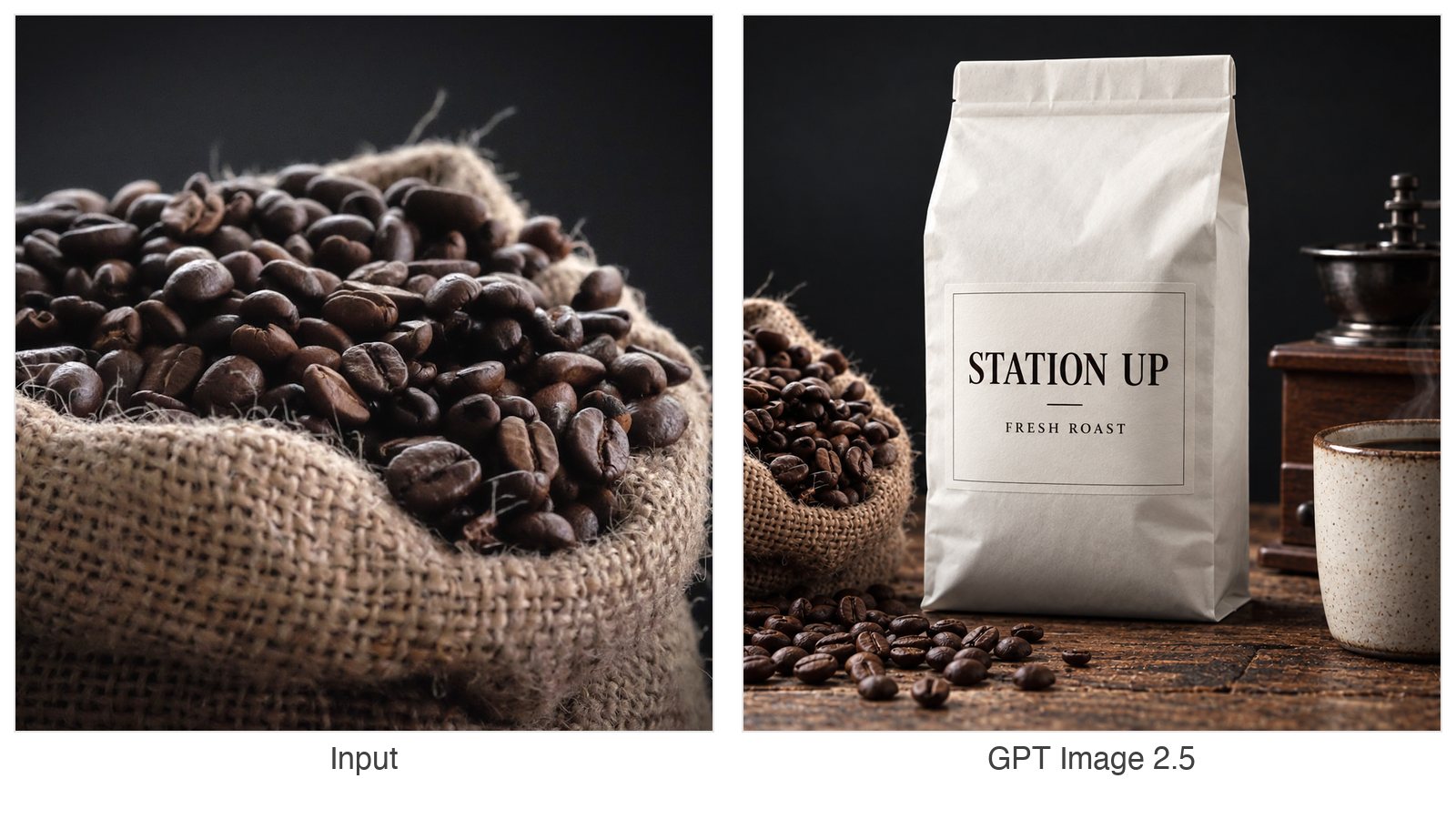
GPT Image 2.5 is now available in the ImagEditorAI editor — it sits at the top of the model picker and is exclusive to Pro plans. If you have used GPT Image 2 here before, this post answers the three questions that matter: what the new model actually changes, how it compares to GPT Image 2, and when each one is the right pick for the edits you already do on this site.
What GPT Image 2.5 changes
GPT Image 2.5 is OpenAI's newest image editing generation, served through the same provider pipeline as the rest of our model catalog. Three capability lines stand out for editing work — the kind you do when you already have a photo and want a controlled change:
- It follows the prompt more literally. Object-level instructions like "change the jacket, keep everything else" land closer to the letter. Fewer edits drift into neighboring regions, which means fewer reruns when your prompt already names what to keep.
- Text and layout render more cleanly. Labels, packaging copy, and small type survive edits with fewer warped or invented glyphs — the classic weak spot of image models.
- Identity and fine detail hold better. Faces, skin texture, fabric weave, and product geometry stay closer to the input across an edit, which matters most for portrait and product photography.
GPT Image 2.5 ships in two editions, and both are in the picker: GPT Image 2.5 (Sunburst — the flagship) and GPT Image 2.5 Flare (a speed-optimized edition with near-flagship quality). Both editions cost the same credits — the version changes the generation profile, not the price.
These are directional differences, not a guarantee for every image. Results are still generative: if an edit misses, adjust the prompt and rerun — failed tasks never keep your credits.
GPT Image 2.5 vs GPT Image 2
GPT Image 2 remains in the picker and stays open to everyone. Here is how the two models differ on this site:
| Dimension | GPT Image 2 | GPT Image 2.5 |
|---|---|---|
| Availability | Open to everyone (guests edit at 1K) | Pro plans only |
| Output size | 1K / 2K / 4K tiers | 1K / 2K / 4K tiers with aspect-ratio control |
| Cost per edit | 3 / 5 / 8 credits at 1K / 2K / 4K | 6 / 10 / 16 credits at 1K / 2K / 4K (either edition) |
| Instruction following | Strong | Stronger — keeps edits on target with fewer reruns |
| Text and layout rendering | Good | Cleaner small type and label work |
| Detail and identity fidelity | Good | Better face, texture, and geometry preservation |
| Best for | Everyday edits on the free quota, first drafts | Client-facing results, product and portrait finals |
The practical rule: keep using GPT Image 2 for quick, low-stakes edits — it is the cheapest way to spend the free credits that refresh every UTC day (3 for guests, 9 for signed-in accounts, not accumulating). Move to GPT Image 2.5 when the edit has to be right the first time: a product shot a customer will see, a portrait you will publish, or any prompt with a long keep-list.
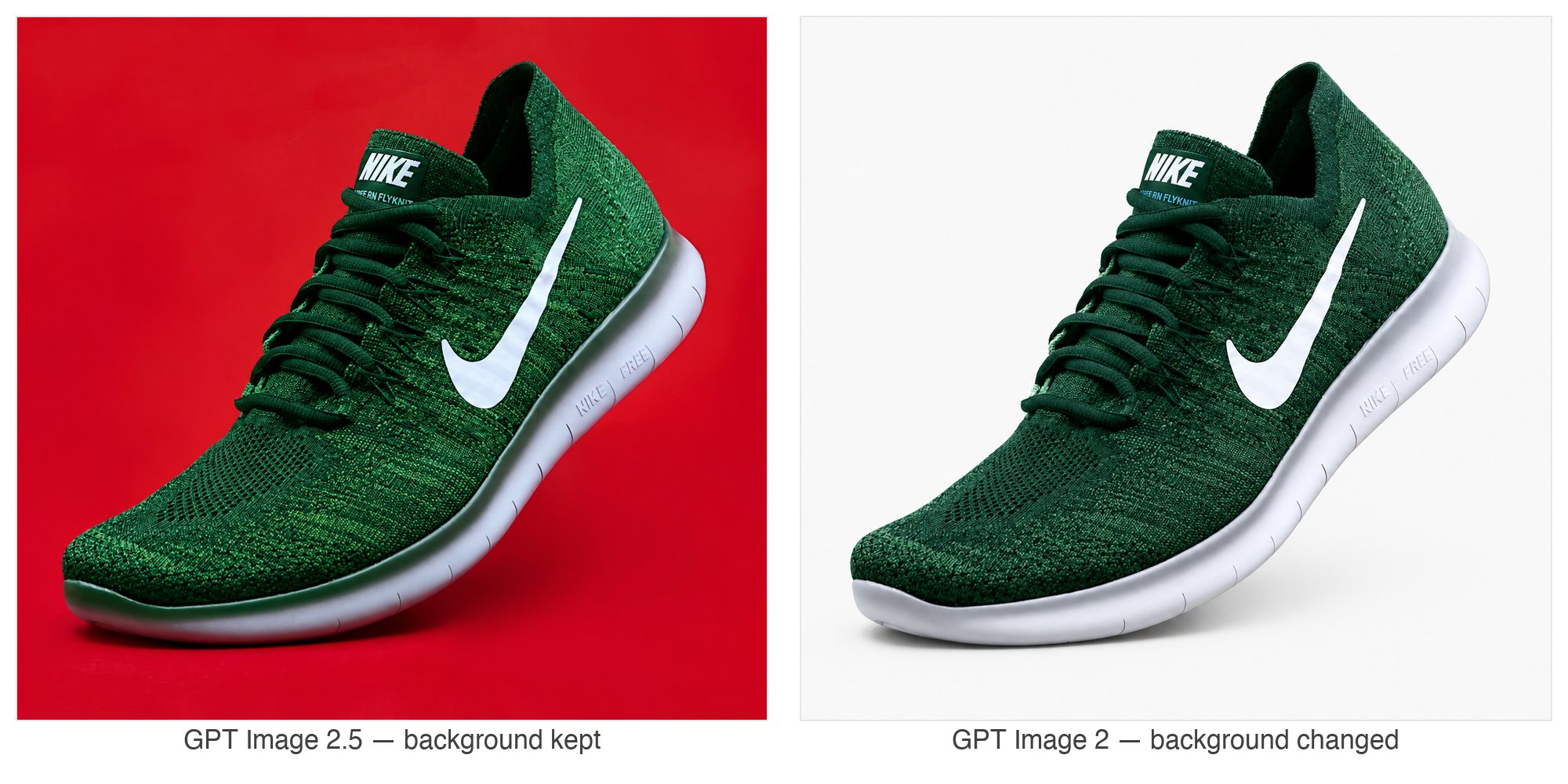
You can see the difference with the same prompt on the same input: asked to turn a sneaker forest green while keeping everything else unchanged, 2.5 recolors only the shoe — GPT Image 2 also replaced the background.
What it means for your workflows
The editor on this site is task-driven: each tool page pre-configures the prompt patterns, and you bring the photo. GPT Image 2.5 raises the ceiling on all of them, with the biggest gains in three groups.
E-commerce
Product work benefits the most, because product edits live or die on object boundaries:
- White background: subjects keep their edges and shadows behave more predictably when the new background is composited in.
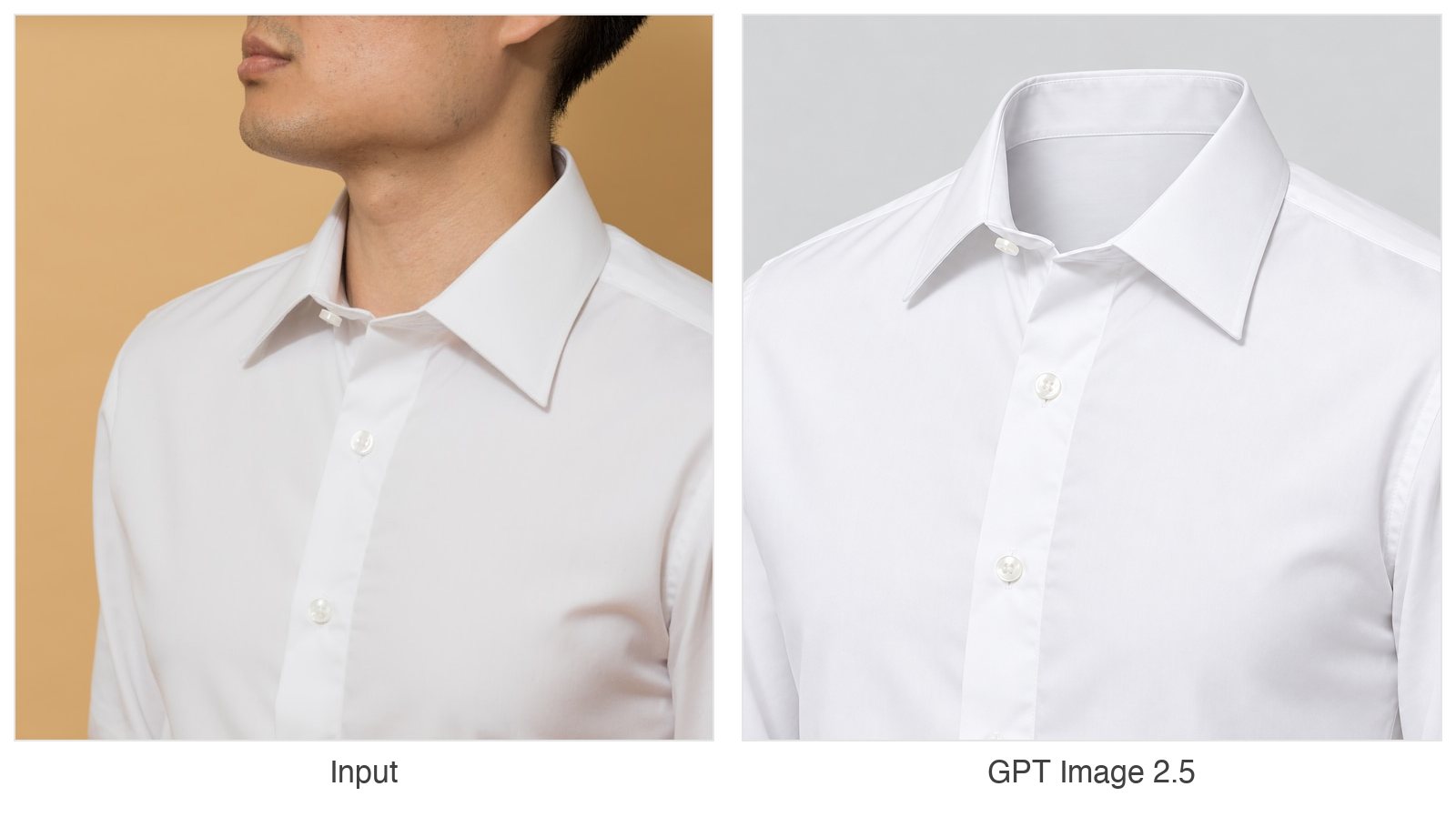
- Ghost mannequin: garment shape and stitching survive the human removal step with fewer artifacts.
- AI clothes changer: swapping an outfit stays on the garment — less bleed onto skin, hair, or the background.
- AI image recolor: color stays on the named object, the recurring pain point when changing deep colors to light ones.
The ghost mannequin workflow — one of the trickiest edits because the person and background disappear while the garment must not — is a good example of what 2.5 preserves:
For any of these, name the object and the keep-list explicitly ("keep the face, the hands, and the background unchanged") — the stronger the model, the more literally it takes you at your word.
Portraits
Professional headshots and AI fashion models depend on two things at once: changing clothing, lighting, or setting while keeping the person recognizable. GPT Image 2.5's better identity retention means fewer results that look "off", and its texture handling keeps skin from going plastic. Start from a sharp, well-lit input photo — the model preserves detail, it cannot invent what the photo never captured.
Everyday edits
For background removal and undoing the matcha filter, the difference is mostly in edges and overall cleanliness. These are also the edits where GPT Image 2 on the free quota is usually enough — save 2.5 for the shots you will keep.
Availability and credits
GPT Image 2.5 is available now on every paid plan — Basic, Standard, and Premium. Credits work the same as everywhere else on the site: an edit costs 6 credits at 1K, 10 at 2K, and 16 at 4K, the same for both editions, on top of the free daily quota that every visitor and account keeps receiving. If a task fails at the provider, the credits return to your balance automatically.
How to use it
- Open the editor, upload your photo (up to five reference images), and pick GPT Image 2.5 from the model list — it leads the Pro group, where you can also switch the Version (Sunburst or Flare) in the options panel.
- Describe the edit and what to keep — for example:
Change the sneakers to forest green. Keep the shape, laces, sole, and white background unchanged. - Generate. Compare against your input at full size; if something drifted, tighten the prompt and rerun — your credits come back on failures.
Prefer a dedicated studio? Try GPT Image 2.5 online
If you want a playground built entirely around this model family,
GPT Image 2.5 Studio
is an independent web app worth a visit: it covers text-to-image and photo editing with both editions side by side — Flare for quick exploration, Sunburst for fine detail — plus a visual model comparison and a practical prompt guide. It runs in your browser on a credit basis, which makes it an easy way to run the same prompts against the raw models and study how each edition responds before committing credits to a large batch.
FAQ
Do I need a subscription to use GPT Image 2.5?
Yes. It is the Pro-plan flagship: Basic, Standard, and Premium subscriptions all unlock it, together with the other Pro models and 2K–4K resolutions. GPT Image 2 stays open to everyone.
Should I pick GPT Image 2.5 or GPT Image 2?
Pick 2.5 for finals — product shots, portraits, anything a customer sees, or prompts with a long keep-list. Pick 2 for quick everyday edits and drafts, especially while working within the free daily credits.
How many credits does GPT Image 2.5 cost?
An edit costs 6 credits at 1K, 10 credits at 2K, and 16 credits at 4K — the same for the Sunburst and Flare editions. The price per edit is always shown in the editor before you generate.
What happens if a generation fails?
Failed tasks are refunded automatically — the credits return to your balance and you can retry with an adjusted prompt. Results are generative and can vary, so compare at full size before you download.
Ready to try it? The Pro plans unlock GPT Image 2.5 alongside the other Pro models, and every tool above works right in the browser — start from white background if you shoot products, or AI headshot generator if you shoot people.
ImagEditorAI Team
Written by the ImagEditorAI Editorial Team. We research and test image editing workflows, outfit coordination, and generative AI models.
Test your outfit combination on yourself
Generate coordinated outfits or swap clothing pieces on your own photo with AI before wearing or buying.
Related Guides & Articles

Christmas AI Photo Prompts: Twelve Tested With Real Results
Twelve christmas AI photo prompts to copy, each shown beside the original photo it transformed, plus what every line of the prompt does and where to run it.

Jewelry Product Photography: The Home Setup Guide
Jewelry product photography at home: the setup, per-piece shots for rings and necklaces, the failure modes to expect, and the edit pass that finishes them.
Product Photography Ideas: 12 Shots That Sell
Twelve product photography ideas ranked by effort: the setup, the phone version, and the edit pass that turns each shot into a finished listing image.