ImagEditorAI

AI Fashion Model: Turn Garment Photos into Model Shots

Upload a clear photo of a garment, describe the model and the pose in one line, and get an on-model shot for your store. Skip the studio day: the AI fashion model tool dresses a generated model in your garment.

  • No sign-up
  • Free daily credits
  • No watermark
0 / 1000

Example 1 of 3

Studio shot from a product photo

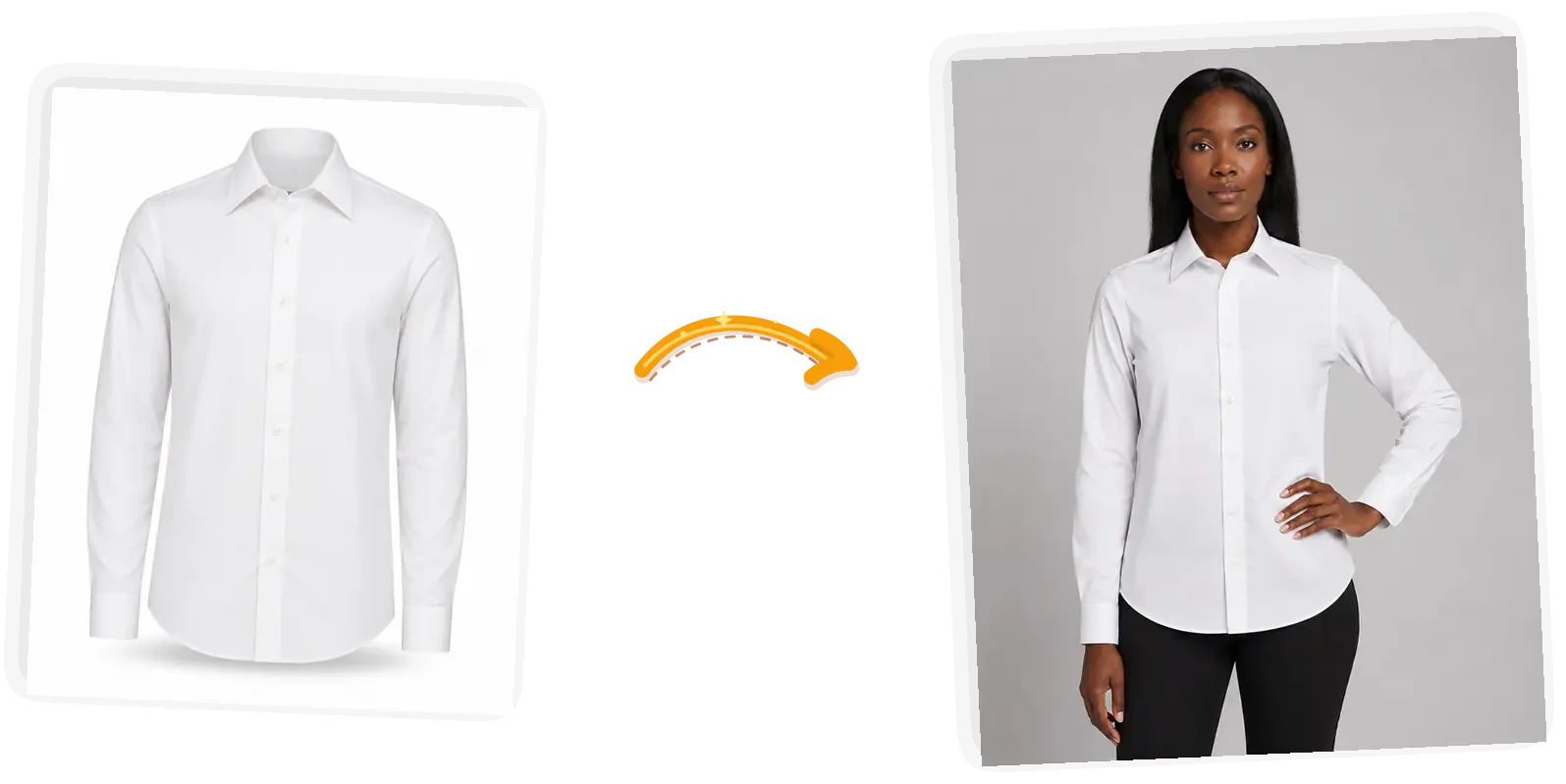
The white dress shirt leaves its ghost form and appears on a model with long dark hair, hand on hip
Prompt

Put this white dress shirt on a female model with dark skin and long black hair; front-facing studio shot with one hand on her hip; keep the collar, buttons, and fabric unchanged

What Makes This AI Fashion Model Tool Different

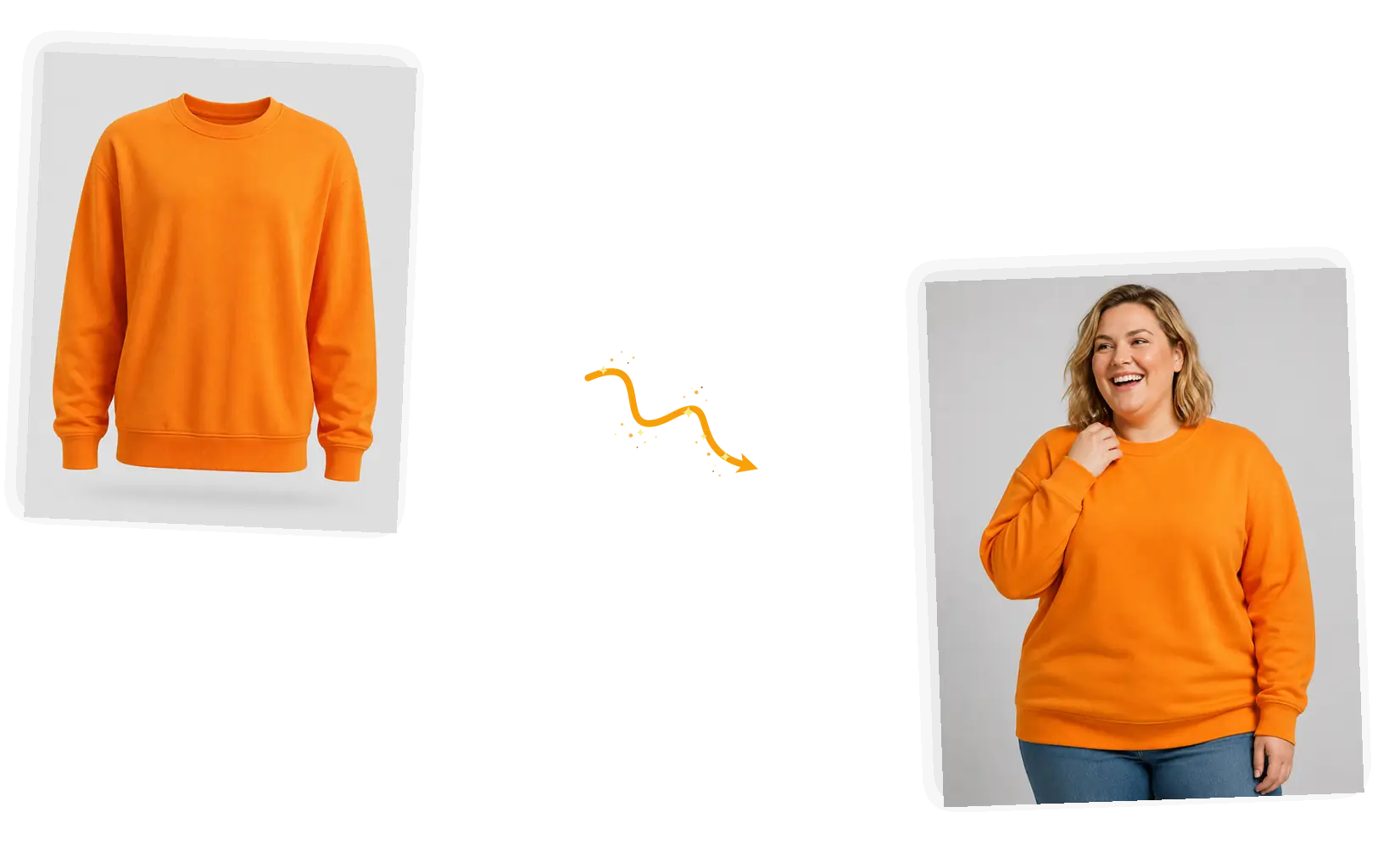
An orange sweatshirt from a ghost product shot appears on a laughing plus-size model with blonde hair

Describe the model, or let the tool pick

Skin tone, hairstyle, body type: name them in the prompt and the model matches. Say nothing about the model and the tool still puts the garment on someone who fits it. Either way, rerun until the casting feels right.
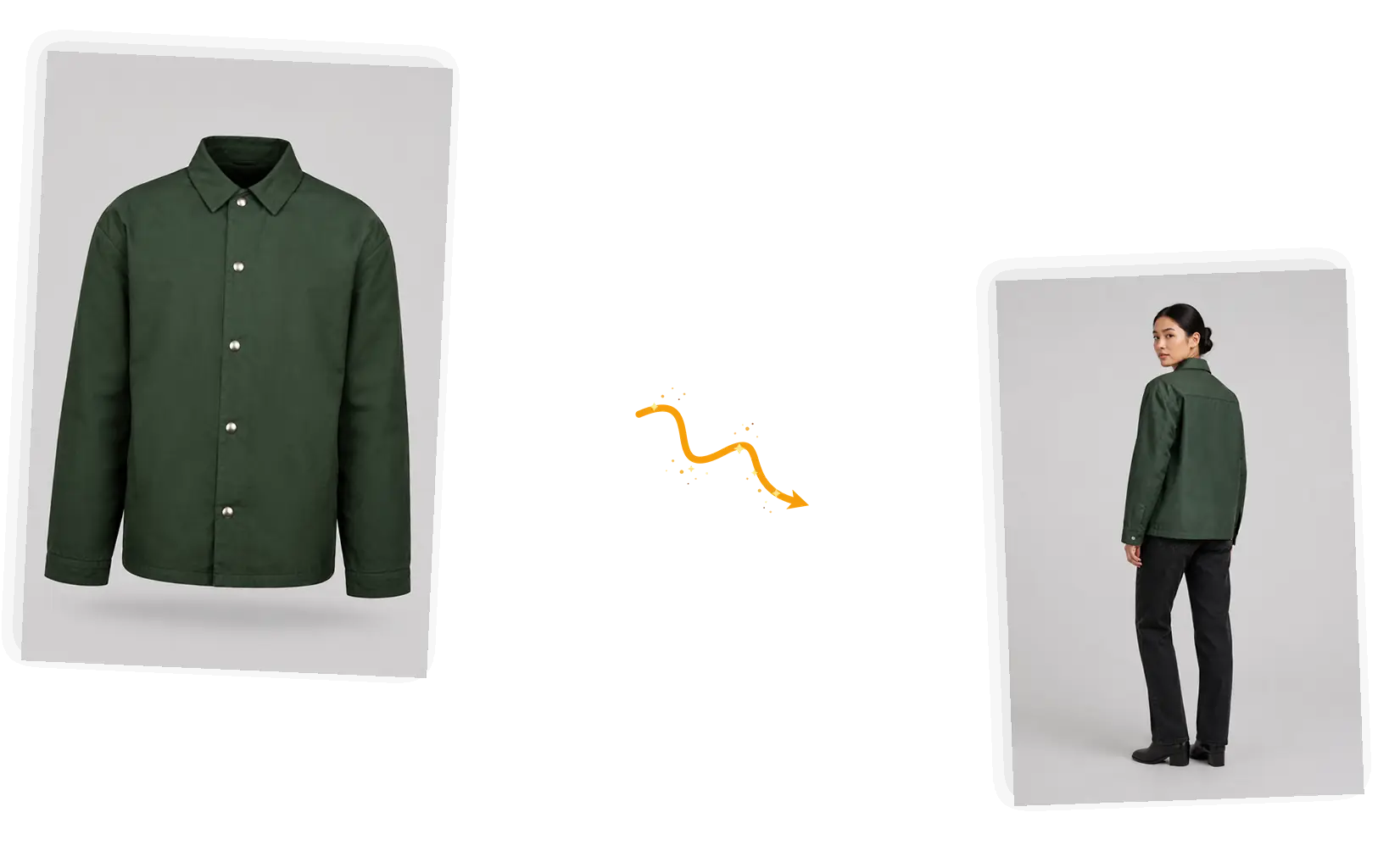
A green chore jacket appears on a model in a back three-quarter view, looking over her shoulder

The pose follows your words

Front-facing, looking back over a shoulder, walking toward the camera: the action line steers the shot more than any slider. Write the movement you want the listing to show and generate again when the stance misses.

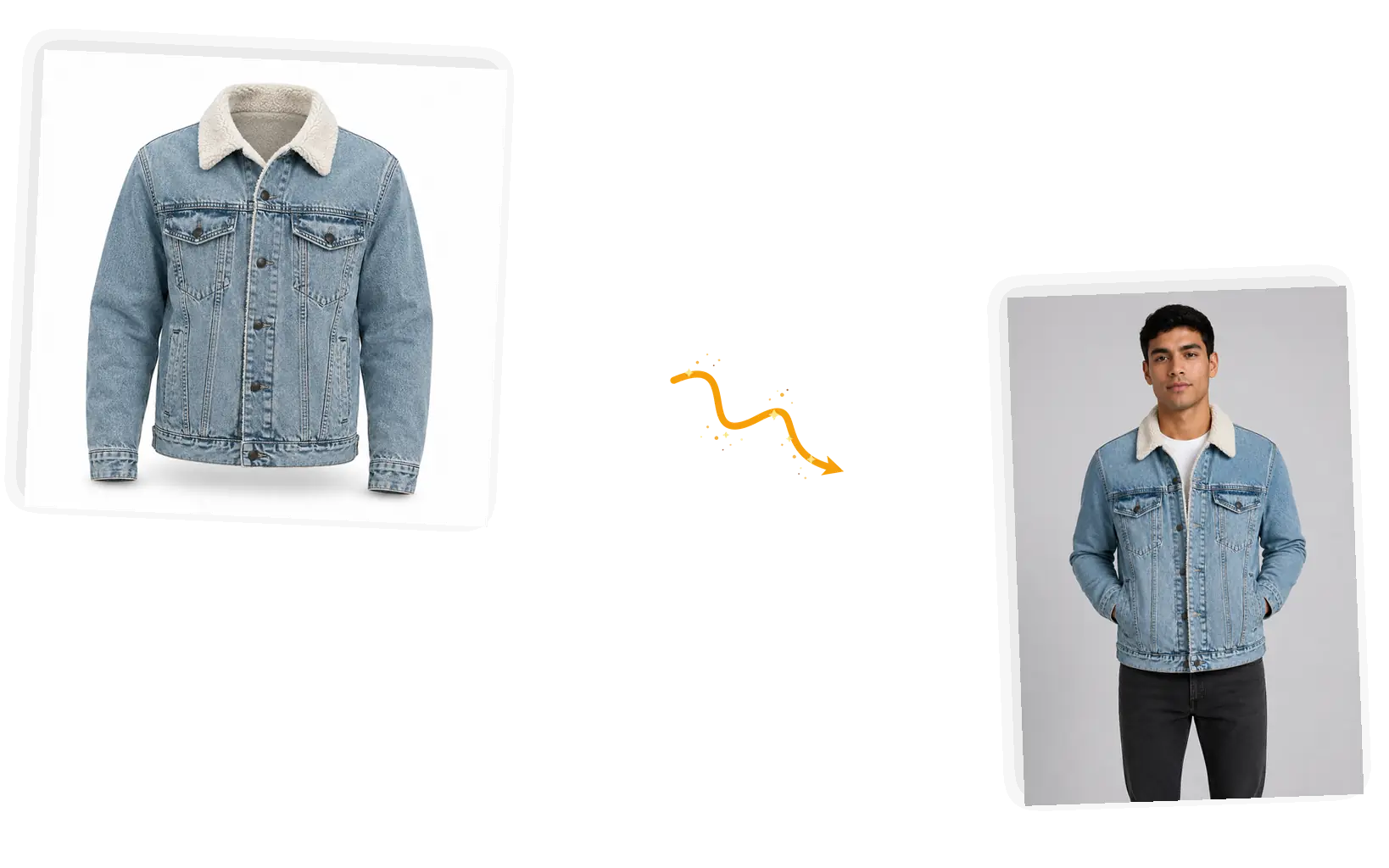
A denim jacket with a sherpa collar appears on a male model standing with his hands in the pockets

The garment stays the star

The prompt names what must not change: the print, the color, the seams, the neck label. Generated results can drift, so zoom in on the details that sell the piece and rerun when one of them moved.

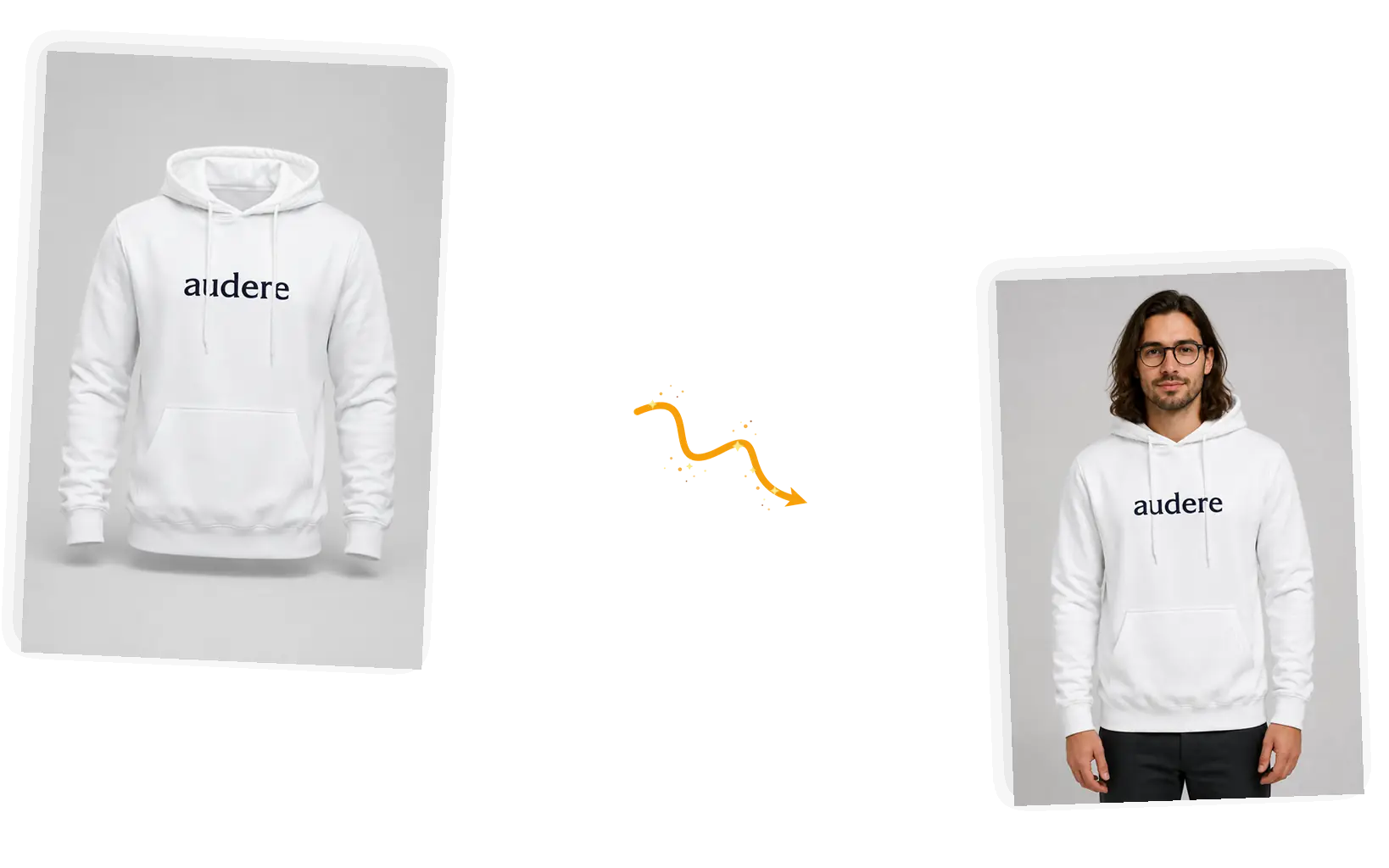
A white printed hoodie appears on a model with glasses standing relaxed in a studio

Keep shooting in the same workspace

One garment, many shots: bring the result back with a new pose, a different model, or a white background for the listing slot. Download at full resolution whenever a take works.

What Is the AI Fashion Model Tool?

The AI fashion model tool turns a clear garment photo into an on-model shot. Upload a product picture on a mannequin, a hanger, or laid flat, write one sentence about who wears it and what they are doing, and the tool generates a model in your garment against a plain studio background. Describe the skin tone, hairstyle, and body type when the casting matters; leave the description out and the tool picks a fitting model on its own. Sellers use it for catalog images, new-arrival shots, and listing slots that need a human silhouette without a photoshoot. One garment per edit, and the result is generated, so check the print and the seams against the original and rerun when something moved.

How to Use the AI Fashion Model Tool

Five steps from garment photo to on-model shot.

1

Upload a clear garment photo

Bring the picture as a JPEG, PNG, or WebP file up to 20MB. Mannequin, ghost, flat lay, and hanger shots all work; sharp edges and even light give the model more to work with than dim or crumpled photos.

2

Describe the model and the pose

Say who wears the garment and what they are doing: skin tone, hairstyle, body type, then an action such as standing with a hand on the hip or walking toward the camera. Skip the description and the tool picks the model for you.

3

Choose the output

Keep the original aspect ratio or switch to a square for marketplace listings. The editor shows the credit cost before you generate.

4

Generate and check the garment

The tool dresses a generated model in your garment. Zoom in on the print, the seams, and the neck label next to the original; rerun with a sharper description when a detail moved.

5

Use the result

Download at full resolution, or keep going in the same workspace: another pose, a different model, or a white background for the listing slot.

Why Use the AI Fashion Model Tool?

A model without a casting

A studio day books models, a photographer, and light, and it repeats for every collection. The AI fashion model tool starts from the product photos you already have and returns on-model shots in the same session.

One sentence, not one workflow

Compositing a garment onto a person by hand means masks, warping, and relighting. Here you describe the model and the pose in one line, and the suggestions show the pattern.

The result is a starting point

Download the shot, then keep working in the same workspace: rerun with a new pose, put the garment on a white background, or hand the packshot to the image text editor.

How the AI Fashion Model Tool Compares

Three common ways to get on-model clothing photos, compared on what each one asks of you and where the prompt-driven tool fits.

DimensionStudio reshootGeneral AI chatAI Fashion Model Tool
InputThe garments, plus model bookings, photographer, and studio timeThe garment photo pasted into a conversation, with no editing workflow around itThe garment photo, plus one sentence for the model and the pose
Control over the resultFull control on set, at reshoot costLimited say over who wears the garment or how they posePrompt-level: describe skin tone, hairstyle, body type, and pose, or leave them out
OutputWhatever the shoot day produces, in its stylingA one-off image that often comes back off-ratioOn-model shots at the ratio you choose, with high-resolution download
Consistency across a batchOne model per shoot day; more garments need more schedulingEach rerun starts from scratch, so the same model is hard to keepDescribe the model once and reuse the description across garments
Learning costPhotography, casting, and scheduling knowledgePrompt trial and error with no guardrailsOne sentence; ready-made suggestions show the pattern
Result managementFiles handed over by the photographerA conversation history you have to dig throughDownload it, or keep editing in the same workspace

Tips for Better AI Fashion Model Prompts

The prompt is the whole instruction: who wears it, what they do, what stays.

  • Describe the model when the casting matters: skin tone, hairstyle, body type. Leave it out and the tool picks a fitting model automatically.
  • Write the action in concrete words: front-facing with a hand on the hip, walking toward the camera, looking back over one shoulder.
  • One garment per prompt; name what must stay and zoom in on the print and seams after each run.

Put this [garment] on a [model description]; [pose or action]; keep the [print, seams, neck label] unchanged.

A studio listing shot

Too vague

model wearing my shirt

More useful prompt

Put this white dress shirt on a female model with dark skin and long black hair; front-facing studio shot with one hand on her hip; keep the collar and buttons unchanged

A street-style angle

Too vague

make it look like a real person

More useful prompt

Put this black hoodie on a model with a medium build and short curly hair, walking toward the camera; keep the drawstrings and pocket unchanged

A back view that still sells

Too vague

turn the model around

More useful prompt

Have a model with black hair in a low bun wear this green jacket; back three-quarter view looking over her shoulder; keep the collar and snap buttons unchanged

Who Uses the AI Fashion Model Tool

Clothing brands

A collection reads better when every piece has an on-model shot, and a shoot day per drop rarely pays for itself. The AI fashion model tool fills the gaps from product photos you already have, one garment at a time.

Ecommerce sellers

Listings with a human silhouette earn more clicks than flat product shots. Supplier photos on mannequins or hangers can become on-model images without a studio, and the description keeps the casting consistent across a catalog.

Vintage and resale shops

One-of-one pieces never come back for a reshoot, and a mannequin shot flattens them. The AI fashion model tool puts each garment on a generated model so buyers can picture the fit and the drape.

AI Fashion Model FAQ

Quick answers about the AI fashion model tool, before you run the first edit.

You upload a clear photo of a garment and write one sentence about the model and the pose. The tool generates a model wearing your garment against a plain studio background and returns an on-model shot. The result is generated, so compare it with the original and rerun when a detail moved. To put a garment on a person in an existing photo instead, use the AI clothes changer.

No. Describe the skin tone, hairstyle, and body type when the casting matters, and the tool follows the description. Leave it out and the tool picks a model that fits the garment automatically. Both paths rerun the same way, so you can try a different casting with one more sentence.

Your prompt names what must not change, such as the print, the color, the seams, and the neck label, and the tool follows that keep-list. Because the shot is generated rather than cut and pasted, small drift can happen. Compare the result with the original at full size and rerun when something important moved.

JPEG, PNG, and WebP files up to 20MB each, up to five reference photos per edit. A sharp, evenly lit garment photo on a mannequin, a ghost form, a hanger, or laid flat all work; a photo with visible edges and readable prints gives the model less to guess. A close-up of the fabric or label can ride along as a second reference.

Three usual causes: a blurry or dim source photo, a description that conflicts with the garment, or one prompt asking for too much. Start from a clearer photo, simplify the model description to one or two traits, or split the request into two edits, then rerun.

Eligible guests refresh to 9 free credits each UTC day, and account holders refresh to 15; unused daily credits do not accumulate. The editor shows the credit cost before each generation.

Try the AI Fashion Model for Free

Upload the garment photo, describe the model and the pose, and the AI fashion model tool returns an on-model shot in the same workspace.