
ImagEditorAI

Matcha Filter Remover: Undo the TikTok Matcha Look

The matcha filter left your photo green, grainy, and painted over. Upload it, say what natural looks like, and the matcha filter remover rebuilds the picture while your face, pose, and scene stay where they were.

  • No sign-up
  • Free daily credits
  • No watermark
0 / 1000

Example 1 of 3

Clear the tint and grain

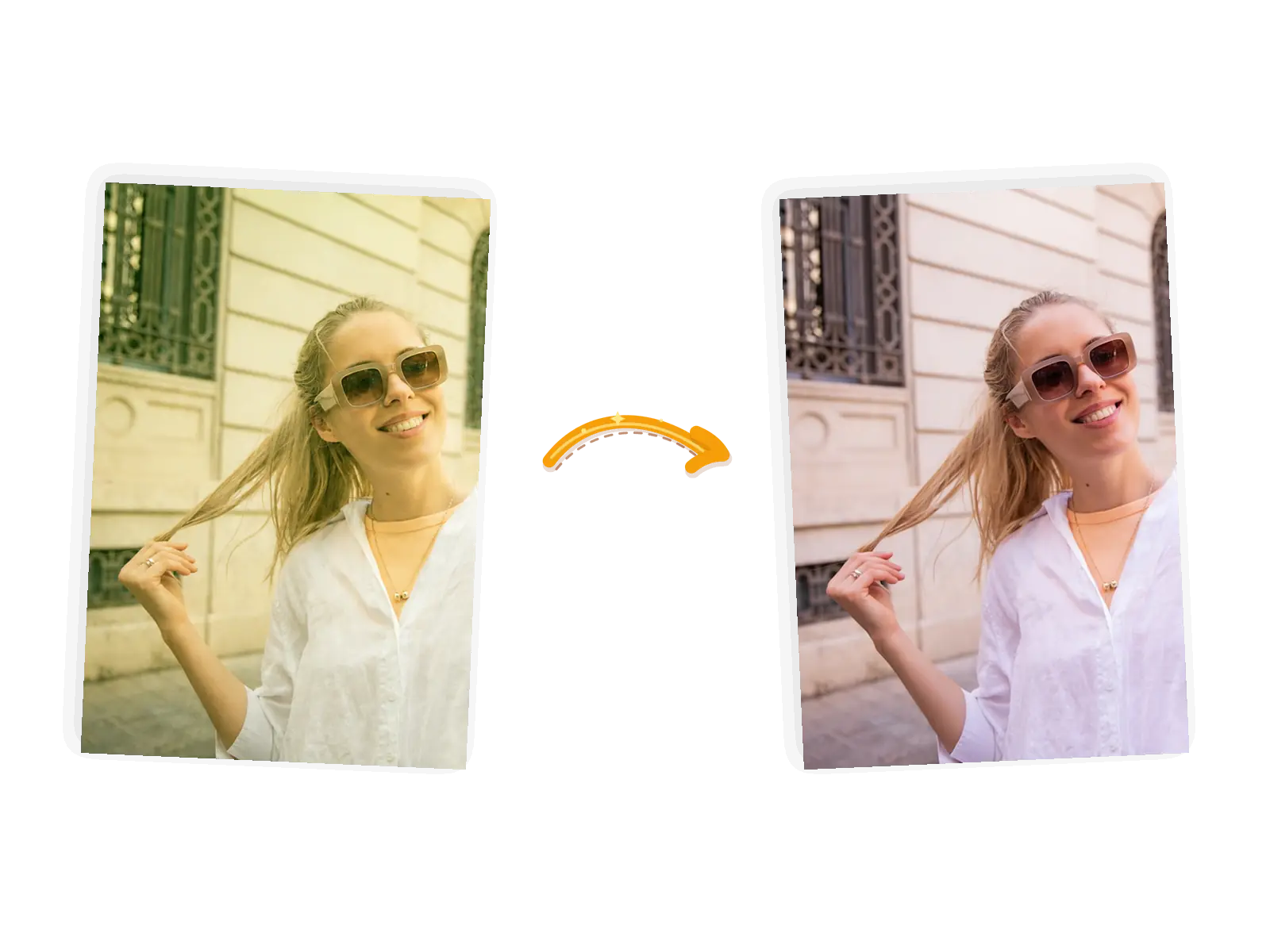
The selfie edit: the green tint and grain wash out and natural skin tones return while her pose and the street behind her stay
Prompt

Remove the green-yellow tint and grain from this selfie; bring back natural skin tones and contrast; keep the face, hairstyle, and expression exactly unchanged

What Makes This Matcha Filter Remover Different

A close-up portrait moves from a warm green cast back to natural skin tones while the smile stays

Say what natural means

A green cast alone is not the whole filter: there is grain, haze, and skin turned smooth as paint. Put it in your own words: natural skin tones, real texture, daylight. The model reads that description while it rebuilds the picture.


Two laughing faces keep their expressions and hoodies while the flat filtered color gives way to natural tones

A keep-list holds the person steady

Name what must not move: the face, the glasses, the pose, the hoodie, the background. The model treats that list as the frame around the edit, and generation can vary, so compare the result with the original and rerun if a detail drifts.

A couple's field photo returns from a heavy green haze to natural daylight

Made for the photos the trend hit

Trend selfies, couple shots, group photos, stills saved from a replay: if the matcha look reached it, this is the fix. Bring JPEG, PNG, or WebP files up to 20MB each, one photo per edit.

A phone selfie keeps the moment and loses the filter, ready to download

The un-filtered photo is yours to keep

Download the result at full resolution with no watermark, or keep working in the same workspace: another pass at the color, a crop, or a different edit entirely.

What Is the Matcha Filter Remover?

The matcha filter remover is an image editor for one job: photos that came out looking like the TikTok matcha trend, with a yellow-green cast, film grain, and skin repainted smooth. You upload one photo and describe the natural version you want, and the model rebuilds the picture while your face, pose, and background hold still. A light filter mostly leaves color and grain behind, so the result can sit close to the photo you started from. A heavy filter replaces skin and hair with a painted texture, and there the result is an AI-built approximation, close in spirit but not the original pixels. The typical jobs are trend selfies, couple and group shots, and saved screenshots. One photo per edit; download at full resolution or move straight into the next edit.

How to Use the Matcha Filter Remover

Five steps from filtered photo to a natural-looking version.

1

Upload the filtered photo

Bring the picture as a JPEG, PNG, or WebP file up to 20MB. Photos where faces are still easy to recognize give the model more to hold on to than ones the filter almost erased.

2

Describe the natural version

Say what the filter did and what natural means here: skin tones, texture, daylight, the room's real colors. Name what stays too: the face, the pose, the background.

3

Choose the output

Keep the original aspect ratio, or pick a preset when the platform asks for one. The editor shows the credit cost before you generate.

4

Generate and compare

The remover rebuilds the picture in place. Set it next to the original and zoom in on faces before you call it done; rerun with tighter wording if something drifted.

5

Use the result

Download at full resolution, or keep editing in the same workspace for another color pass or a completely different edit.

Why Use the Matcha Filter Remover?

One pass handles the whole look

The matcha filter is a stack: color cast, grain, haze, repainted skin. Correcting that by hand means sliders, masks, and retouching skin texture one face at a time; here one sentence covers all of it in a single generation.

A sentence, not a correction workflow

You already know what natural looks like; the tool only asks you to say it. The ready-made suggestions show the pattern, and the editor shows the credit cost before each run.

The photo keeps going

Download the natural version at full resolution, then stay in the workspace if you want more: another pass, a crop, or an entirely new edit on the rebuilt photo.

How the Matcha Filter Remover Compares

Three ways to get a filtered photo back to natural, compared on what each one asks of you and where the prompt-driven remover fits.

DimensionManual color correctionOne-tap filter removersMatcha Filter Remover
InputThe filtered photo, plus time in an editorThe photo; the tool applies a fixed correctionThe photo, plus one sentence describing the natural version and what stays
Control over the resultFull control, if you can name curves, masks, and skin retouching by handFilter strength and what stays are whatever the preset decidesPrompt-level: describe skin texture, light, and color; a keep-list holds faces and pose
OutputWhatever you export after correcting and retouching yourselfA corrected photo at the tool's fixed export settingsA rebuilt photo at the original ratio and full resolution, downloadable and watermark-free
Consistency across rerunsStable once the recipe is built; every new photo repeats the workThe same preset every time, whatever it doesThe keep-list holds faces and background across reruns; color can vary a little
Learning costHours with curves, masks, and retouching toolsMinutes; the preset does the decidingOne sentence; ready-made suggestions show the pattern
Result managementProject files you manage yourselfSaved in the tool's account or exported onceDownload it at full resolution, or keep editing in the same workspace

Tips for Better Matcha Filter Removal Prompts

The prompt is the whole instruction: say what natural means and name what stays.

  • Say what natural means for this photo: natural skin tones, real skin texture, the room's real colors, plain daylight.
  • Name what stays: the face, the hairstyle, the expression, the pose, the background.
  • One photo per prompt; compare the result with the original, zoom in on faces, and rerun with tighter wording when a detail drifts.

Remove the matcha filter and [what natural means]; keep the [face, pose, background] unchanged.

A tinted selfie

Too vague

remove the filter

More useful prompt

Remove the green tint and grain; bring back natural skin tones and contrast; keep the face, hairstyle, and expression exactly unchanged

A painted-on portrait

Too vague

make it look real

More useful prompt

Repaint the skin with real texture and natural color; keep the face, glasses, pose, and background exactly unchanged

A washed-out group photo

Too vague

fix the colors

More useful prompt

Bring back natural colors and daylight; keep every face, outfit, and the background exactly unchanged

Who Uses the Matcha Filter Remover

Trend participants

The Wild Hearts Whisper trend pulled you in, and now the filtered version is the only copy of a photo you liked. A matcha filter remover rebuilds the natural shot from it, no reshoot needed.

Friends in filtered photos

Someone else ran the filter over your face and the group chat loved it. The same photo through a matcha filter remover comes back as a version you would actually keep.

Screenshot savers

Replays, lives, and trend screenshots pile up in the camera roll. A matcha filter remover cleans up the stills worth keeping, one photo at a time.

Matcha Filter Remover FAQ

How the matcha filter remover works, what it can and cannot recover, and what it costs.

Upload one photo and write a sentence: what the filter did, what natural means here, and what stays. The matcha filter remover reads that instruction and returns a rebuilt picture; it lands in the workspace where you download it or keep editing, and a failed task refunds its credits automatically.

No tool can. The filter does not keep the pixels it covers. When the matcha look is a light tint with grain, the rebuilt photo can sit very close to what the camera saw. When the filter repainted skin and hair, the result is an AI-built natural version that can differ from the real person. It is worth a close look before you post it as the real thing.

JPEG, PNG, or WebP files up to 20MB, one photo per edit. Up to five reference photos are supported when a second image helps describe the look you want. Photos where faces are still easy to recognize rebuild more convincingly than ones the filter almost erased.

No. This remover works on still photos, one image per edit. A filtered video is a different job; every frame would need its own rebuild, so a video-focused tool is the better fit there.

Results can vary. Rerun with tighter wording: name the skin texture you want, the light in the room, the exact features that drifted. Compare runs side by side and keep the closer one. Credits come back automatically when a task fails.

Guests get 9 free credits and signed-in accounts get 15, refreshed every UTC day. They do not accumulate. A standard 1K edit costs 3 credits, so the daily allowance covers several removals at no cost, with no watermark on the results.

Try the Matcha Filter Remover for Free

Bring one filtered photo, say what natural looks like, and keep the person. The rebuilt version is one prompt away.