









Real Estate Photo Editing: Listing-Ready in One Prompt

Upload the shot and name the fix: the gray sky over the facade, the dim living room, the empty bedroom waiting for furniture. The editor repairs or restages what you point at while the house itself stays put.

  • No sign-up
  • Free daily credits
  • No watermark
0 / 1000

Example 1 of 3

Replace a gray sky

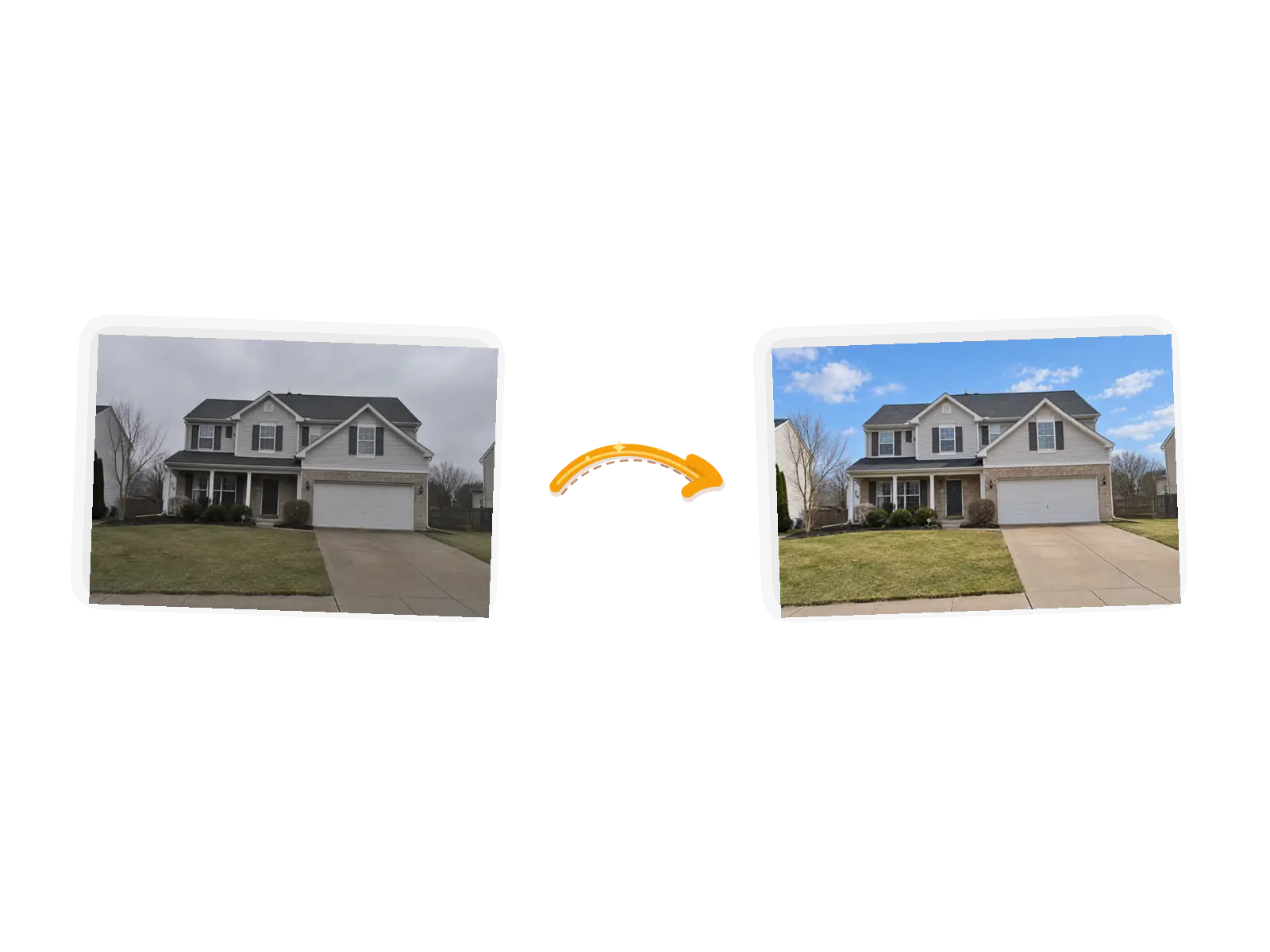
Editor example: a gray overcast listing exterior with the sky replaced by clear blue, input on the left and result on the right
Prompt

Replace the overcast sky with a clear blue sky and match the daylight on the house. Keep the house, roof, lawn, driveway, and everything else exactly unchanged.

What Makes This Listing Photo Editor Different

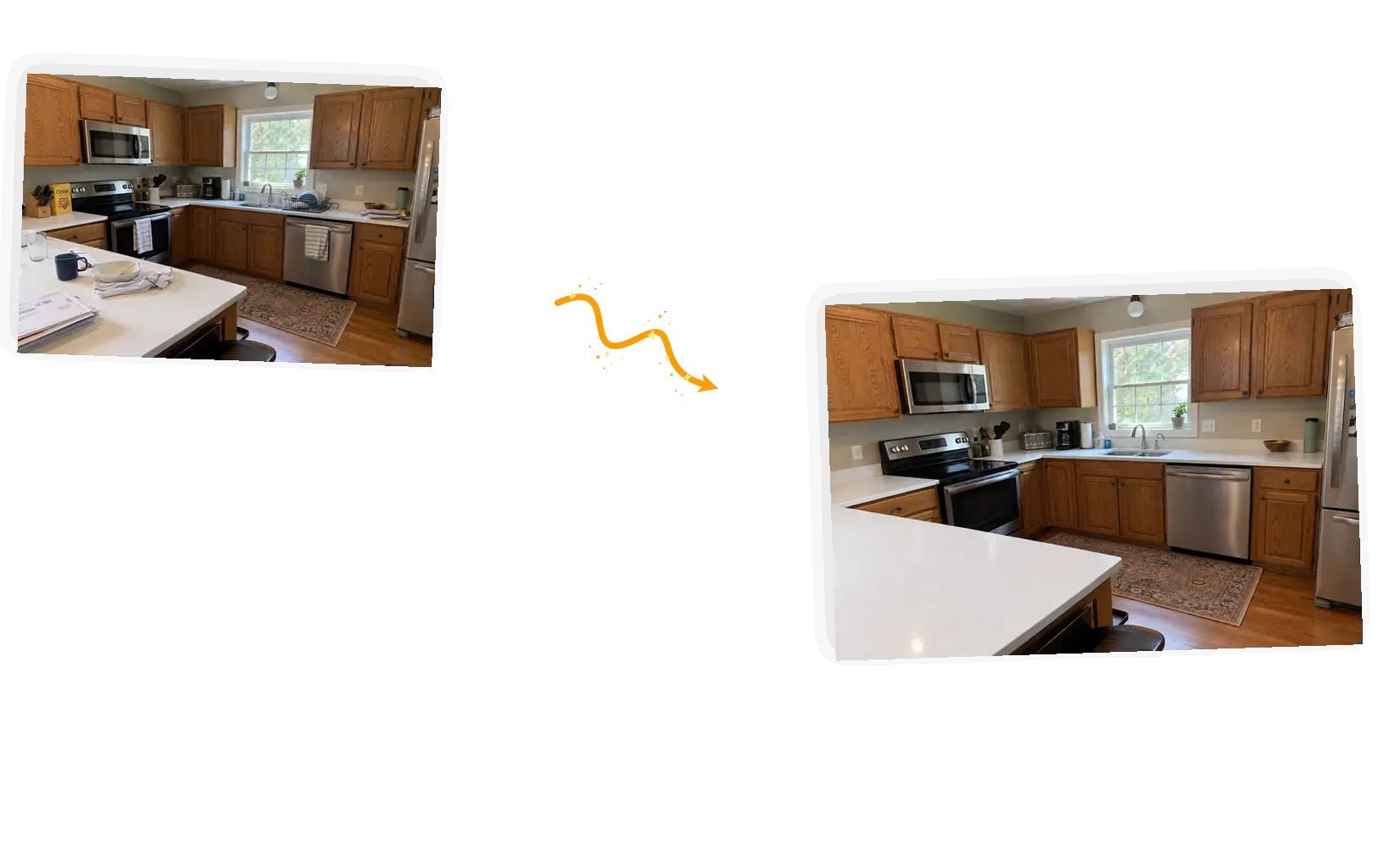
Before and after: a listing photo where only the named fix was applied

Name the fix, not the whole listing

Bundled presets decide for you what a listing needs. Here the prompt carries the fix and where it applies: the gray sky over the facade, the shadowed corner of the den, the mail stacked on the counter. The editor works on what you named, and the rest of the property stays as shot.
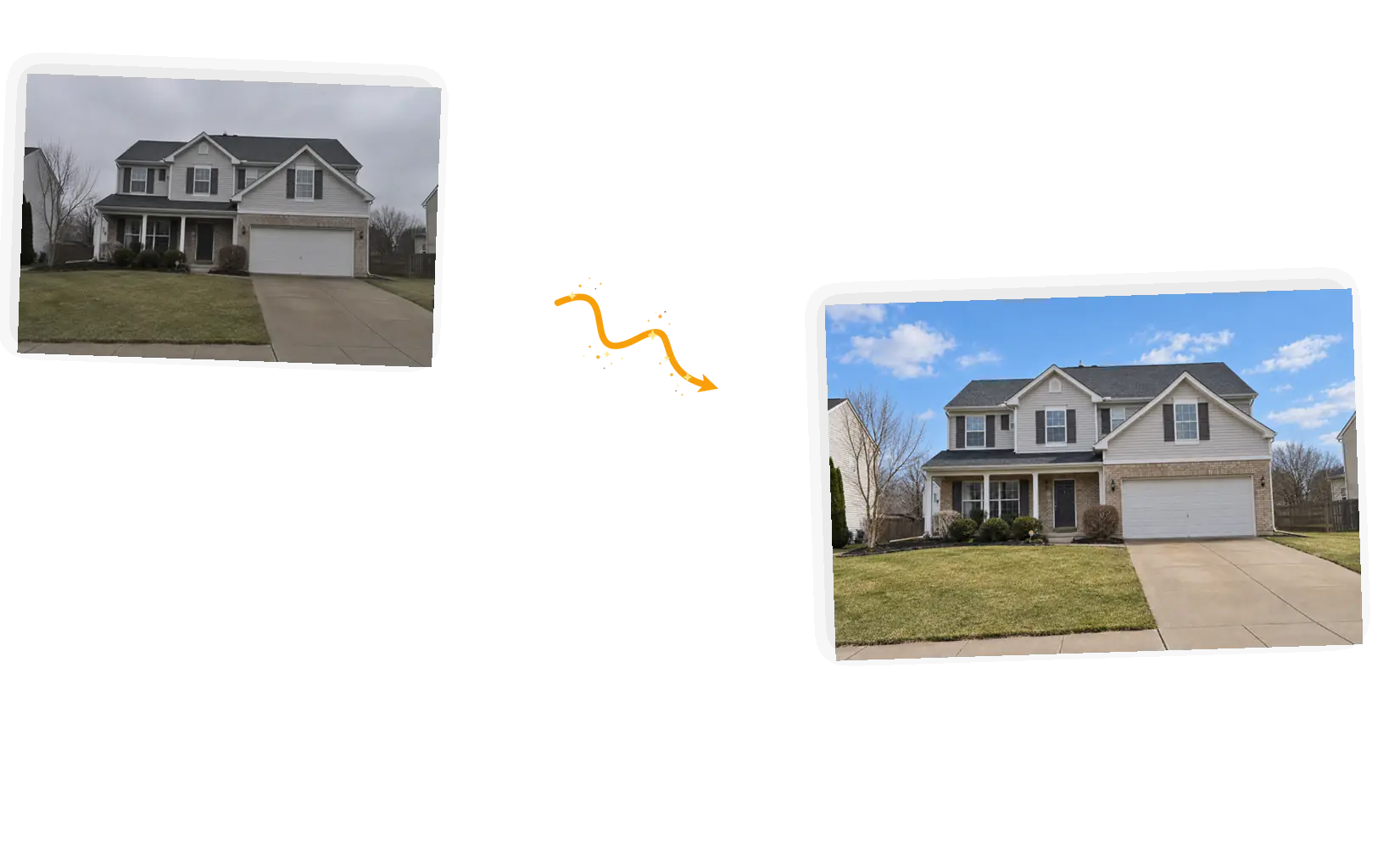
Before and after: a listing exterior with the gray sky replaced by blue

Skies and light, matched to the property

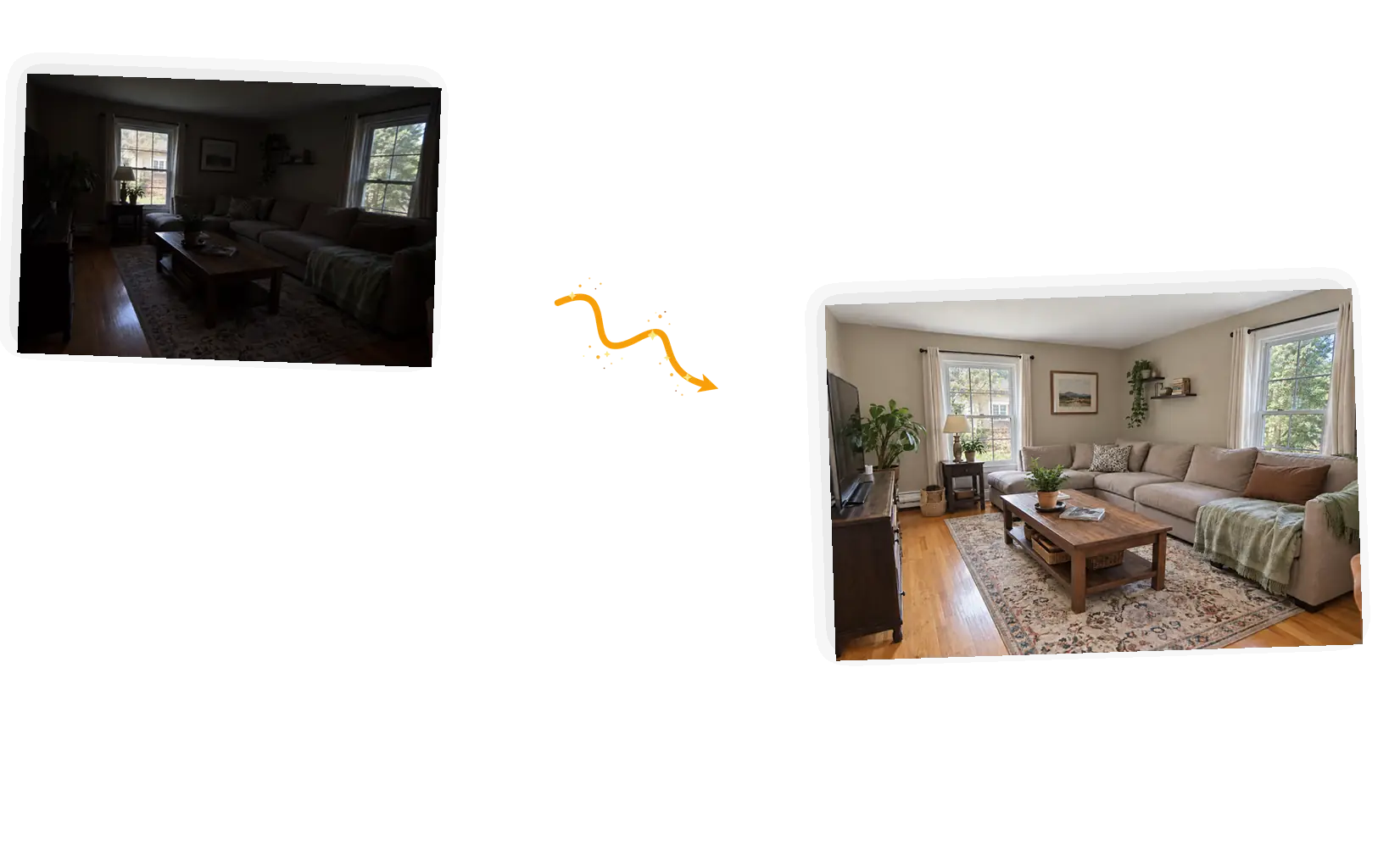
An overcast exterior reads as a gloomy house. Name the sky and the editor replaces it with clear weather while matching the daylight already on the walls and lawn. Dim interiors get even, natural light the same way, so rooms look like the showing buyers expect.

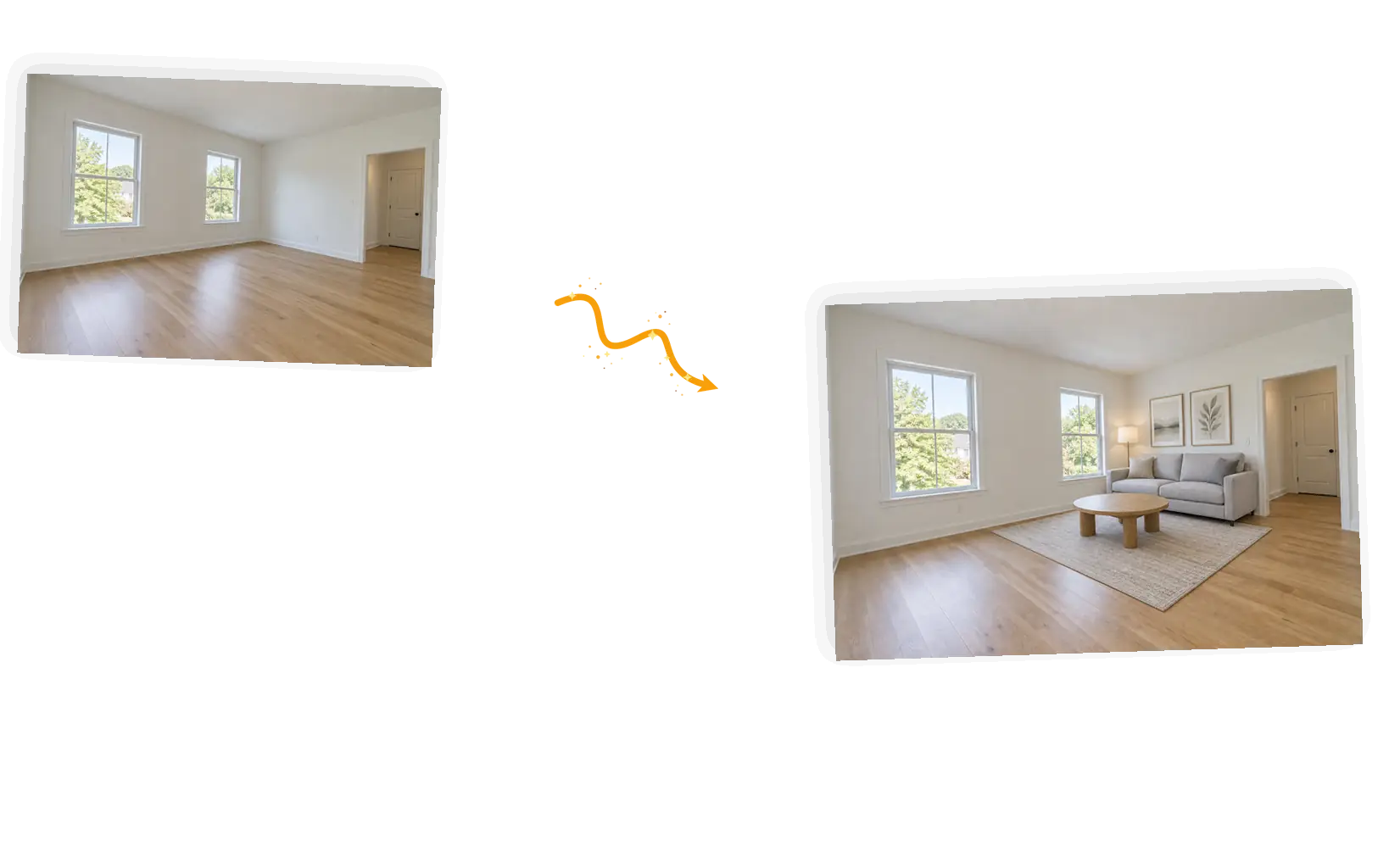
Before and after: an empty room virtually staged with furniture

Stage an empty room with a prompt

Virtual staging turns a vacant room into a furnished space buyers can picture living in. Describe the sofa, the rug, the floor lamp, and keep the walls, windows, and floor plan unchanged so the room itself stays honest. Staged furniture is new pixels, so note the photo as virtually staged in the listing.

Before and after: a cluttered kitchen counter cleared for listing

Rerun until the photo shows the house

Every run is fresh pixels, so two passes can differ. When an edit misses (a patched lawn, a sofa that fights the room), rerun with a sharper description. Failed tasks return their credits automatically, so trying approaches across a shoot costs attention, not money.

What Is Real Estate Photo Editing?

Real estate photo editing prepares a listing shot for the market: skies cleared, rooms brightened, counters cleared, empty spaces staged. If you have been quoted per-photo prices for that work, this tool takes prompts instead: name the fix, list what must stay (the house, the layout, the view out the window), and the editor re-draws only what you pointed at. It handles one photo at a time. Edited and staged areas are new pixels, so zoom in against the original and mark staged photos as virtually staged in the listing.

Edit your listing photo now

How to Edit a Real Estate Photo

Five steps from raw listing shot to a photo worth clicking. The whole loop runs in the editor on this page.

1

Upload the listing shot

Phone photos and camera shots both work. Drop in a JPEG, PNG, or WebP up to 20MB; the straighter and sharper the original, the more precisely the prompt can work.

2

Name the fix and where it applies

The gray sky above the roofline, the dim corner behind the sofa, the clutter on the counter. One fix per prompt keeps the edit predictable.

3

Say what stays and choose the output

Keep the house, the room layout, the view out the window: write the keep-list into the prompt. Keep the original ratio for listing shots; 1K at 3 credits fits the daily free allowance.

4

Generate and check the edit

Edited regions come back re-drawn. Zoom in: rooflines should stay straight, window views should keep their shape, staged furniture should sit naturally in the room. Not right? Rerun with a sharper location.

5

Use the result

Download full resolution with no watermark, or keep editing in the same workspace: a sky pass, an object removal, or a rerun of this edit.

Why Use a Prompt-Based Listing Photo Editor

Edits the fix, keeps the property

Global presets repaint the whole frame, including the parts that were fine. Naming the fix edits just that region, so the house, the lot, and the room layout stay as shot and the photo still tells the truth about the property.

No per-photo invoice

Editing services bill per photo, and a full shoot adds up. The daily free allowance (9 credits for guests, 15 for accounts) covers several single-fix edits, and failed tasks return their credits automatically.

The result keeps working

Downloads are full resolution and watermark-free, and every edit stays in your workspace. Follow with a sky pass or an object removal on the same photo without starting over.

How Real Estate Photo Editing Compares

The rows below compare the usual ways to prepare a listing photo, not specific products.

DimensionManual retouchingGeneral AI chatReal Estate Photo Editing
Starting shotAny shot your software acceptsOne upload per messageJPEG, PNG, or WebP up to 20MB, one photo per edit
Pointing at the fixMask, clone, and retouch by handDescribe it in words; the model decides what changesName the fix and where it applies in the prompt
Protecting the propertyWhatever your mask excludes is safeLimited local control over an uploaded photoKeep-list in the prompt: house, layout, window view
Staging an empty roomComposite furniture by hand, layer by layerFurniture often ignores the room's dimensionsDescribe the furniture; the keep-list holds the walls and floor
OutputWhatever your software exportsOften re-generated at fixed sizesOriginal ratio, full-resolution download, no watermark
RerunningStep back and redo the editsRegenerate and compareRerun with a sharper description; failed tasks refund credits

Tips for Better Listing Photo Prompts

The prompt is the whole control surface. These three rules cover most of what goes wrong.

  • Name the fix and where it applies together: 'the gray sky above the roofline' beats 'make it look nice'. One fix per prompt.
  • Write the keep-list explicitly: the house, the room layout, the view out the window. Unnamed areas are the ones that drift.
  • Judge the edit at full zoom before downloading. Rooflines and window frames show drift first; rerun with a tighter location if they wobble.

Fix the [problem + where it sits]; keep [the house / the room layout / the view] unchanged.

A gray exterior

Too vague

Make this house photo look better.

More useful prompt

Replace the flat gray sky with a clear blue sky and match the daylight on the house; keep the house, lawn, and driveway exactly unchanged.

A dim interior

Too vague

The room is too dark.

More useful prompt

Brighten the living room with even natural window light and true-to-life colors; keep the furniture, windows, and wall color unchanged.

An empty bedroom

Too vague

Add furniture to this room.

More useful prompt

Virtually stage the bedroom with a queen bed, two nightstands, and a rug that fit the space; keep the walls, windows, and flooring unchanged.

Who Uses This Listing Photo Editor

Listing agents

A listing goes live with whatever photos exist this morning. When you need real estate photo editing between appointments, naming the fix in a prompt is faster than briefing a retoucher and waiting a day.

Real estate photographers

Shoot days stack up, and so does the editing queue. Handing the one-off fixes (a sky, a dim corner) to a prompt keeps the session billable and the delivery on time.

FSBO homeowners

Selling by owner means the photos are yours to make. A pass of real estate photo editing, sky to staging, puts your listing next to the agency shots without a service invoice.

Real Estate Photo Editing: FAQ

How real estate photo editing works by prompt, what sky replacement and virtual staging involve, and what to check before you list.

You upload the listing shot, name the fix and where it applies, and list what must stay. The editor then runs a generative edit that re-draws the named regions and leaves the rest of the frame alone. Real estate photo editing this way is targeted: pixels in the edited areas are new, anchored by your keep-list, and you judge the result at full zoom before downloading.

Sky replacement is widely treated as a cosmetic correction in real estate marketing, closer to color correction than to a material change. Rules differ by platform and region, so check your MLS or listing site before publishing. The keep-list helps here: edits that alter the property itself (a changed roofline, a filled-in pond) should stay out of the prompt.

Virtual staging adds furniture to a photo of an empty room: new pixels matched to the room's walls, windows, and floor. Common practice marks staged photos with a note such as 'virtually staged' so buyers are not surprised at the showing. The keep-list in your prompt keeps the room itself unchanged, which is what keeps the staging honest.

Straight-on shots with readable edges work best, phone or camera. JPEG, PNG, or WebP files up to 20MB, one photo per edit, with up to five reference photos supported for staging style. Sharp originals give the prompt precise edges; heavy HDR brackets give it contradictions.

Services bundle a preset style and bill per photo. Here the prompt names the fix, the keep-list protects the property, and results can vary, so rerun with sharper wording when a pass misses. When a task fails outright, its credits are returned automatically.

Guests get 9 free credits and signed-in accounts get 15, refreshed every UTC day. They do not accumulate. A standard 1K edit costs 3 credits, so the daily allowance covers several single-fix passes, and downloads carry no watermark.

Try Real Estate Photo Editing for Free

Upload one listing shot, name the fix, and check the edit up close before you download.

Start editing