
Nano Banana 2.1 vs Nano Banana Pro: Which for Photo Edits?
Nano Banana 2.1 vs Nano Banana Pro: official specs, real per-image prices, and three photo-edit tests we ran side by side, with the results pictured.

Google now sells two image models under the same banana nickname, and telling them apart is its own small task. So here is the direct answer to nano banana 2.1 vs nano banana pro: pick 2.1 for everyday photo edits. It is Google's new fast default, it costs about a third of Pro's price at 2K, and in our background-swap test it held the product detail that Pro repainted. Keep Pro for the jobs where a face has to stay recognizable, in-image text has to read correctly on the first pass, or the output is a final asset a client will see.
That is the short version. The rest of this guide backs it up: what each model officially is, how the specs and prices compare, three editing tests we ran through the same pipeline with the results pictured, what independent testers found, and where a focused editing tool still beats both models.
What Nano Banana 2.1 and Nano Banana Pro actually are
Nano Banana 2.1 is Google's newest Flash-tier image model
(gemini-nano-banana-2.1), released in early October 2026 as the
successor to Nano Banana 2. Google's developer docs call it the
"primary high-efficiency workhorse model" and recommend it for all new
projects, and the Gemini app markets it as the "most advanced image
model with enhanced quality, reasoning, and visual design" for paid
plan users (Gemini's image generation
page documents what
each plan includes). DeepMind's model page
compresses the pitch into a tagline: "Pro-level image generation and
editing. Flash-level speed."
Nano Banana Pro (gemini-3-pro-image) is the older, heavier model,
built on Gemini 3 Pro and released in November 2025. The same docs
position it as "the premium choice for the most complex visual tasks",
optimized for professional asset production, with the highest level of
world knowledge, localization, and brand consistency. In the Gemini
app it now sits behind a "Redo with Pro" action, which tells you how
Google sees the relationship: 2.1 is the default, Pro is the upgrade
you reach for on specific jobs.
Two consequences matter for photo editing. First, 2.1 is not a replacement for Pro; it is a replacement for Nano Banana 2, the previous workhorse (which Fuser reports will be shut down on 29 October 2026). Second, the two models accept different inputs: 2.1 takes up to 10 object references and 4 character references, while Pro takes 6 objects, 5 characters, and, uniquely, up to 3 style references. If your edit depends on matching a style, Pro is the only one of the two that accepts it.
Specs and prices side by side
The table below uses Google's official model documentation and pricing page, current as of October 2026.
| Spec | Nano Banana 2.1 | Nano Banana Pro |
| ------------------ | --------------------------------------- | ------------------------------------- |
| Model ID | gemini-nano-banana-2.1 | gemini-3-pro-image |
| Positioning | default workhorse | premium specialist |
| Resolutions | 1K, 2K, 4K | 1K, 2K, 4K |
| Reference images | 10 objects, 4 characters, no style refs | 6 objects, 5 characters, 3 style refs |
| Thinking levels | minimal, medium, high (default medium) | thinking via Gemini 3 Pro |
| Price per 1K image | $0.0336 | $0.134 |
| Price per 2K image | $0.0504 | $0.134 |
| Price per 4K image | $0.113 | $0.24 |
| Watermark | SynthID | SynthID |
Read the price rows as a ratio and the choice gets concrete: at 2K, Pro costs about 2.7 times what 2.1 costs; at 4K, about 2.1 times. One documented 2.1 capability worth noting for editors is mask-based editing, listed on DeepMind's page alongside better visual design and subject consistency. Both models embed SynthID, so output from either stays identifiable as AI-generated.
Google's model documentation and pricing page carry the full details, and they move often enough that you should check them before quoting numbers in a contract.
Three real photo-edit tests, same inputs, both models
Spec tables do not edit photos, so we ran both models through the same pipeline (the KIE API, at 1K, one run per pair) on three jobs this site's readers actually do: replace a product background, remove an object, and change the words on a sign. Identical input photos, identical instructions, both models in October 2026. The original photos are the same sample images used in our AI product photography and AI object remover tools.
Test 1: replace the background, keep the product
A white sneaker on a gray studio background, with this instruction: replace the background with a bright room with oak floorboards and a monstera plant, keep the sneaker exactly as it is.
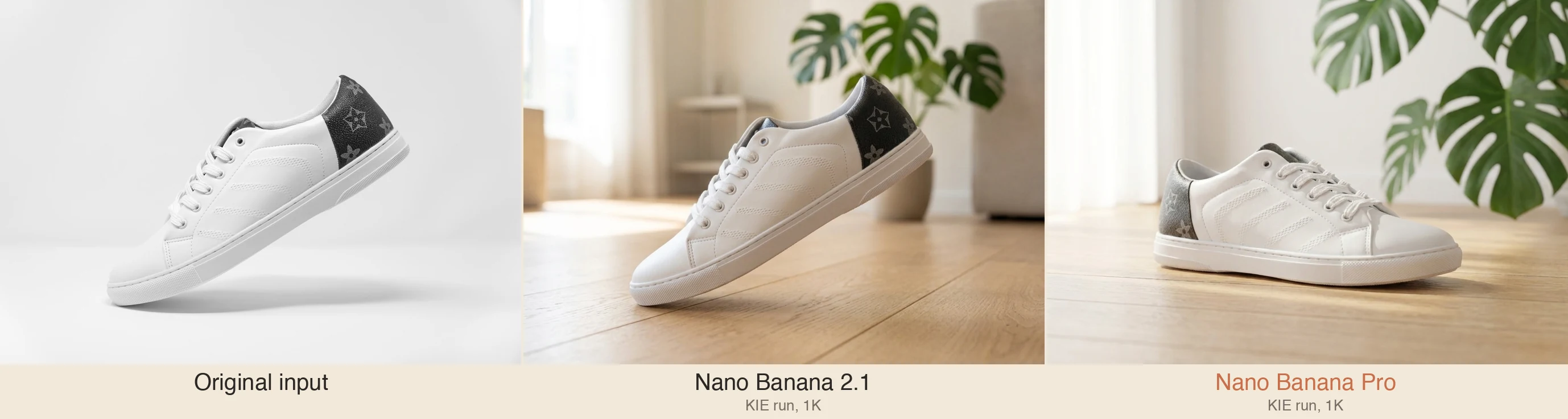
Nano Banana 2.1 kept the sneaker at its original floating angle, with the dark patterned heel panel intact. Pro returned a prettier scene, but it repainted the product: the heel panel came back washed out to gray, and the shoe's angle shifted. When the edit's whole point is "change the surroundings, not the product", that is a fail on the keep-list. If your job is putting a catalog item into a lifestyle scene, this single difference is the argument for 2.1, and it is the same lesson our white background workflow teaches: judge the product first, the scene second.
Test 2: remove one object from a desk
A desk photo with a laptop, coffee mug, notepad, pen, and smartphone. Instruction: remove the smartphone, continue the wood grain, keep everything else exactly the same.
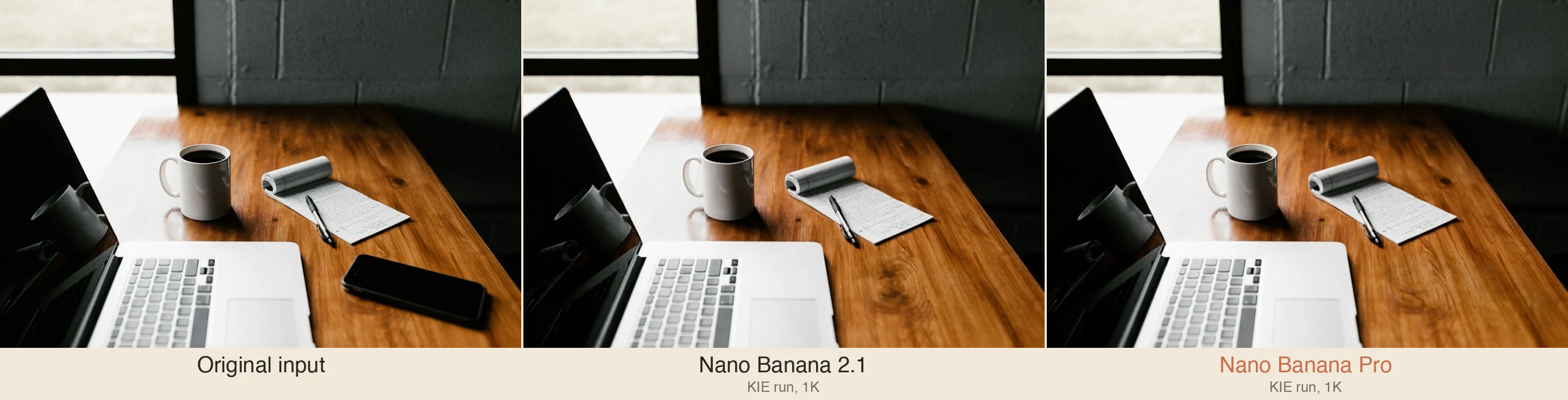
This test produced the most interesting result, and it is about behavior rather than image quality. On the identical instruction, 2.1 executed cleanly: the phone is gone, the wood grain continues, and the rest of the scene survives with small drift in the coffee surface. Pro refused the request: the API returned a content-policy error on an innocuous desk photo. Only after we reworded the instruction did Pro run, and its result was the most faithful output in the whole test set, nearly indistinguishable from the original minus the phone. Two lessons: content filters differ between the models on identical input, and a reworded prompt is a retry lever, not a cheat. For one-object removals you want steerable and done, which is also why a dedicated object removal flow remains the faster path.
Test 3: change the text on a poster
A SUMMER SALE 30% OFF poster, instruction: change the headline to WINTER SALE 50% OFF and keep the font, ink color, paper texture, divider, and sun illustration.
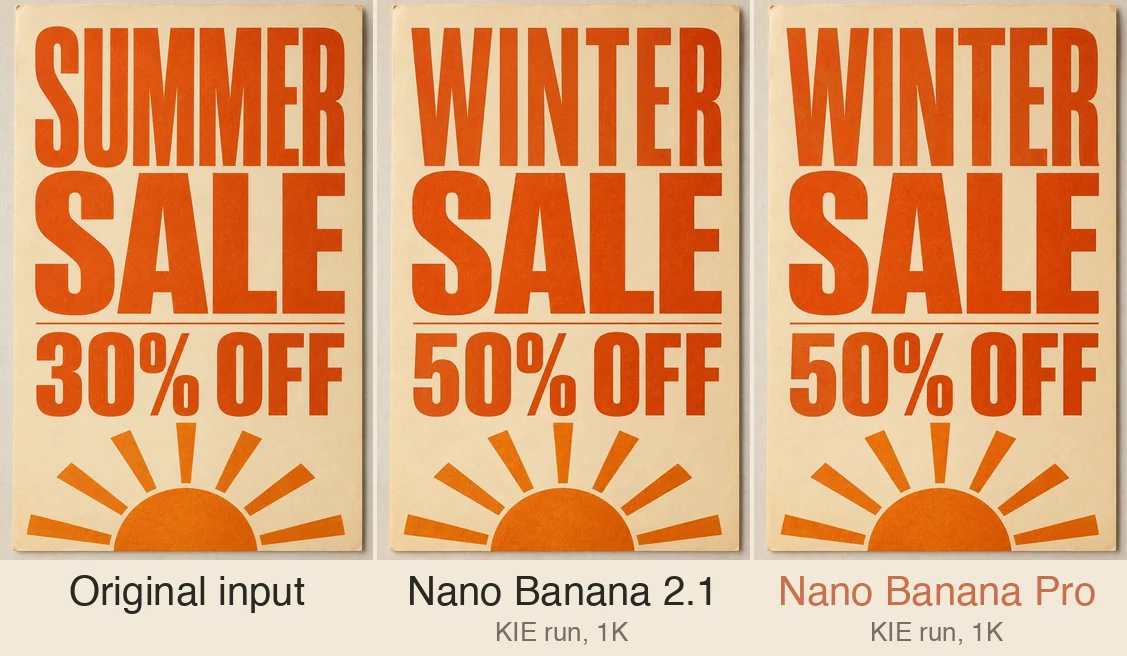
Both models spelled WINTER SALE 50% OFF correctly, which would not have been true of image models two years ago. The differences are in fidelity: 2.1 kept the layout geometry cleaner (margins, divider, sun position) with slightly lighter letterforms, while Pro's letter weights sat closer to the original but its composition drifted, with rays overlapping the sun disk. Call it a tie on correctness, a small edge for 2.1 on layout. For delete-and-retype work on your own photos, a dedicated image text editor still gives you exact control over which characters change.
What independent and official examples show
Our three tests are one sample of one pipeline. Widen the lens and the picture stays consistent. Fuser's same-prompt test suite ran five tests across 2.1, Nano Banana 2, and Pro with identical prompts and inputs, one run per model per task: 2.1 won the photoreal scene and the product-lighting test, Pro won the character-likeness test ("face shape, curls, freckles and a neutral expression all carried over"), and two tests tied, including a poster-text test all three models spelled correctly. Their verdict matches ours: 2.1 as the everyday default, Pro when likeness or in-scene text must land.
On the official side, Google's Gemini image generation page carries the current demo galleries for both models, including the 2.1 examples for infographics, text rendering, and character consistency, and it shows where each model sits in the consumer plans: 2.1 ships with the paid Google AI plans while the free tier runs Nano Banana 2, with Pro offered as a redo action. We link those galleries rather than reposting their images, so the sources stay live and credited.
The combined record, from a docs-level view down to pixel-level runs, points in the same direction: Pro's remaining advantages are narrow and specific, and they are exactly the likeness and final-asset cases.
Which model for which edit
A practical decision list, built from the tests above and Google's documented positioning:
- Background swaps and product scenes. 2.1. Our test showed it holds product detail that Pro repainted, at about a third of the price.
- Object removal and cleanup. 2.1 first; reword once if the filter balks. A focused remover beats both when you need one object gone with zero drift.
- Text edits inside photos. Both are capable now. If the result must carry a specific layout, check at full zoom and keep the better pass; our money is on 2.1 for geometry, Pro for letterform weight.
- Faces, likenesses, characters. Pro. Fuser's likeness test and Google's character-consistency positioning agree here, and Pro's higher character-reference allowance (5 vs 4) helps.
- Brand and style work. Pro, and not only because of positioning: style references are a Pro-only input.
- High-volume drafts. 2.1, by a wide margin on cost.
If you want the full Pro profile, our earlier guide to Nano Banana Pro covers its prompting discipline and SynthID watermark in depth, and GPT Image 2.5 covers the OpenAI alternative Google's models compete with.
Trying both without an API key
You do not need a Google Cloud project to run these edits. This site's browser editor offers both models from this article: Nano Banana 2.1 (3 credits at 1K, 5 at 2K, 8 at 4K) and Nano Banana Pro (5, 6, and 8) sit in the pro model group next to GPT Image 2.5, with the same upload, prompt, and keep-list flow for either. Write the edit as one sentence, list what must not change, and judge the result at full zoom before downloading. New here: guests get 3 free credits a day and signed-in accounts get 9, which covers a first comparison of your own, no card involved.
One honesty note, the same one our earlier model guides make: the editor is our own pipeline into these provider models, not Google's app. The prompts you learned above transfer whole, because good models reward the same clarity.
FAQ
Is Nano Banana 2.1 better than Nano Banana Pro?
Not overall; it depends on the job. Google documents 2.1 as its recommended default, and in our editing tests it kept product detail better at far lower cost. Pro still wins when a face must stay recognizable, when you need style references, or when the output is a final brand asset.
What does Nano Banana 2.1 cost compared to Nano Banana Pro?
Google's API pricing lists 2.1 at $0.0336 per 1K image, $0.0504 at 2K, and $0.113 at 4K. Pro lists at $0.134 per 1K or 2K image and $0.24 at 4K. At 2K that makes Pro about 2.7 times more expensive.
Does Nano Banana 2.1 replace Nano Banana Pro?
No. 2.1 replaces Nano Banana 2 as the default workhorse. Google positions Pro as the premium tier for complex visual tasks, and in the Gemini app Pro is offered as a "Redo with Pro" upgrade on top of 2.1's default output.
Which model should I use for editing photos of people?
For keeping a specific person recognizable, Nano Banana Pro. It won the independent likeness test we found, accepts 5 character references to 2.1's 4, and is documented for brand consistency. For casual people photos where identity drift is acceptable, 2.1 is cheaper and usually enough.
Do both models watermark their images?
Yes. Every image both models generate carries SynthID, Google's invisible watermark, which stays detectable after cropping or re-encoding. It marks the image as AI-generated; it is not a rights statement.
Can I try Nano Banana 2.1 and Nano Banana Pro without an API key?
Yes. The editor on this site runs both models in the browser with no setup: pick the model, upload the photo, write the edit with a keep-list, and compare results at full zoom. Free daily credits cover your first comparisons.
ImagEditorAI Team
Written by the ImagEditorAI Editorial Team. We research and test image editing workflows, outfit coordination, and generative AI models.
Test your outfit combination on yourself
Generate coordinated outfits or swap clothing pieces on your own photo with AI before wearing or buying.
Related Guides & Articles

Nano Banana Pro: What It Is and How to Edit with It
Nano Banana Pro is the Gemini 3 Pro Image model from Google: what it does well, how to prompt photo edits it obeys, SynthID, and a no-setup path.
Clothing Product Photography: A No-Studio Guide
Clothing product photography without a studio: the four shots every garment needs, a window-light phone setup, background calls, and fixes instead of reshoots.
Virtual Try On Apps: What They Do and When to Skip Them
Virtual try on apps come in three kinds: retailer AR, closet planners, and photo-based AI. Here is what each does, and when a browser tab does the job.